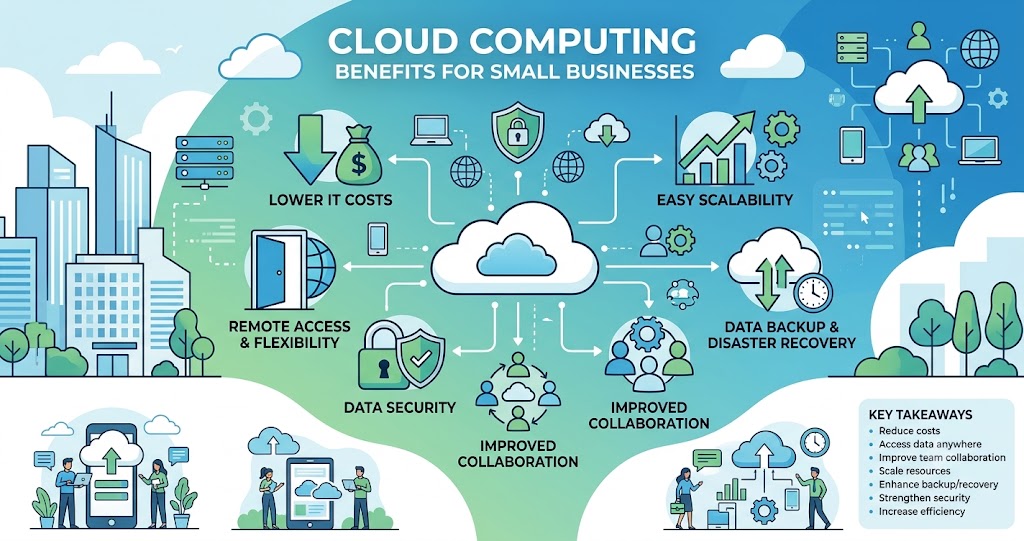
Cloud computing benefits for small businesses include lower IT costs, improved flexibility, stronger data security, easier collaboration, and the ability to scale operations quickly. By moving business applications and data to the cloud, small companies can compete more effectively while reducing the need for expensive hardware and maintenance.
Key Takeaways
- Reduce upfront technology costs
- Access business data from anywhere
- Improve team collaboration
- Scale resources as your business grows
- Enhance data backup and disaster recovery
- Strengthen cybersecurity measures
- Increase operational efficiency
Why Cloud Computing Matters for Small Businesses
Small businesses often operate with limited budgets and resources. Traditional IT infrastructure can be expensive to purchase, maintain, and upgrade. Cloud computing solves these challenges by providing access to software, storage, and computing power over the internet.
Instead of investing heavily in servers and hardware, businesses can pay only for the resources they use.
Expert Insight: In practice, cloud computing allows small businesses to focus on growth and customer service rather than managing complex IT systems.
Top Cloud Computing Benefits for Small Businesses
1. Lower Operating Costs
One of the biggest advantages of cloud computing is cost savings.
Businesses can eliminate expenses related to:
- Physical servers
- Hardware upgrades
- IT maintenance
- Energy consumption
- Data center management
Most cloud providers use subscription-based pricing, making budgeting more predictable.
| Traditional IT | Cloud Computing |
| High upfront costs | Pay-as-you-go pricing |
| Expensive maintenance | Managed by provider |
| Hardware replacement needed | Automatic updates |
| Limited scalability | Instant scalability |
2. Improved Flexibility and Remote Access
Cloud-based systems allow employees to work from anywhere with an internet connection.
Benefits include:
- Remote work support
- Access to files on multiple devices
- Real-time collaboration
- Increased productivity
Whether employees are at home, traveling, or in the office, they can access important business information instantly.
Pro Tip: When deploying cloud solutions, ensure employees use secure login methods and multi-factor authentication.
3. Better Collaboration Across Teams
Modern cloud platforms make teamwork easier than ever.
Teams can:
- Share documents instantly
- Edit files simultaneously
- Communicate in real time
- Manage projects efficiently
This reduces delays and improves overall workflow.
4. Enhanced Data Security
Many small business owners worry about storing sensitive information online. However, leading cloud providers invest heavily in security technologies.
Common security features include:
- Data encryption
- Multi-factor authentication
- Automatic security updates
- Threat monitoring
- Access controls
A common bottleneck is assuming local storage is safer. In reality, professional cloud providers often offer stronger protection than many small businesses can implement independently.
Cloud Computing and Business Growth
As businesses grow, technology needs change. Cloud computing makes scaling simple.
Easy Scalability
Businesses can quickly:
- Increase storage capacity
- Add new users
- Upgrade software features
- Expand computing resources
This flexibility ensures companies only pay for what they need.
| Business Stage | Cloud Advantage |
| Startup | Low initial costs |
| Growing Business | Easy scaling |
| Established Business | Advanced analytics |
| Expansion Phase | Global accessibility |
Expert Insight: Scalability allows businesses to respond quickly to market demands without investing in costly infrastructure upgrades.
Disaster Recovery and Data Backup
Data loss can severely impact business operations.
Cloud solutions help by providing:
- Automatic backups
- Data redundancy
- Fast recovery options
- Business continuity planning
If hardware fails or a cyberattack occurs, businesses can recover critical information much faster than with traditional systems.
How to Get Started with Cloud Computing
If you’re new to cloud technology, follow these steps:
Step 1: Assess Business Needs
Identify the software, storage, and collaboration tools your team requires.
Step 2: Choose a Reliable Provider
Research trusted cloud service providers that match your budget and requirements.
Step 3: Migrate Data Gradually
Move essential files and applications first before expanding usage.
Step 4: Train Employees
Ensure staff understand cloud